Is 256GB enough for a MacBook Air?
Machine MacBook Air 13″, M4, 16 GB / 256 GB
In use since March 2025 (~19 months)
Measured 2026-10-11, macOS 15.7.5
Headline number 18.22 GB free of 245.11 GB
Is 256GB enough for a MacBook Air? The short answer
| Is 256 GB enough? | For my files, absurdly — they total 12 MB. For the software I now run, no |
| Would I buy 256 GB again | No. The step to 512 GB is the cheapest upgrade Apple sells |
| What I’d pay for it | ¥7,999 (what I paid) — and ¥9,499 for the 512 GB, which I did not |
| Where my drive is today | 18.22 GB free, 92.6% full, after 19 months |
If your machine does what mine does, this is worth reading because — your documents are not what fills a modern laptop, and the advice you’ll find online (“you can always use cloud storage”) is written for a machine from a different era. What fills this drive is the tooling: browsers, chat apps, editors, and now AI agents with their own virtual machines.
Skip it if — you bought 512 GB, you keep media on the drive, or you already know what your usage is. This is one machine measured on one afternoon, not a benchmark.
What “256 GB” actually means
A 256 GB MacBook Air gives you 245.11 GB of usable capacity. After 19 months of daily use, mine has 18.22 GB free.
That is the number this whole article is about, and getting it took two commands, because nothing else on the machine reports it consistently:
dfreports the data volume at 151 GiB used, 17 GiB available, 90% capacity.diskutilreports 162.0 GB volume used and 18.2 GB container free.- System Settings → General → Storage reports a third figure, and it is the one that counts purgeable space differently again.
The three disagree because APFS counts snapshots, the sealed system volume and purgeable space in different places. If you are trying to work out whether your drive is full, pick one tool and stay with it. I use the capacity-minus-free figure, because it is arithmetic on two numbers the machine reports directly: 245.11 − 18.22 = 226.9 GB gone.
Two real data points, both mine:
| When | Figure | Where it comes from |
|---|---|---|
| 2026-10-09 | data volume holds 145 GB | recorded in the 19-month review the day it was published |
| 2026-10-11 | 18.22 GB free of 245.11 GB (92.6% used) | measured for this article |
Two points four days apart are not a curve, and I am not going to draw one. What I can do is inventory what is on the drive today, and that turned out to be more interesting than a curve.
Where the space actually is
By the numbers I can name, first-hand:
| Area | Size |
|---|---|
| Home folder | 79 GB |
| — the system library folder | 62 GB |
| — editor extensions and settings | 6.8 GB |
| — AI tool state, caches, package caches | ~7 GB combined |
| — Desktop | 1.6 GB |
| — Downloads | 542 MB |
| — Documents | 12 MB |
| Installed apps | 25 GB |
| System-wide libraries | 11 GB |
| Package manager prefix | 2.3 GB |
Now the same disk, sorted the way I actually think about it:
| Category | Size | What’s in it |
|---|---|---|
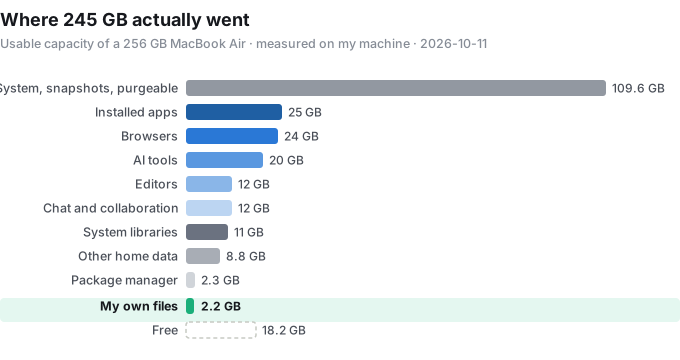
| Browsers | ~24 GB | my main browser’s profile alone is 13 GB, plus its caches, a second browser’s profile, and their updaters |
| AI tools | ~20 GB | one assistant’s sandbox VM images 11 GB, a coding agent’s state 4.5 GB spread across three locations, a chat app’s data |
| Editors | ~12 GB | extensions 6.8 GB, support data 2.8 GB, updater caches 1.4 GB, the app itself 1.4 GB |
| Chat and collaboration | ~12 GB | one messaging app’s container 6.6 GB, two collaboration tools ~5.7 GB combined |
| Everything in the apps folder | 25 GB | a bundled video editor I never open is the single largest one, at 3.7 GB |
Read that third row again: 6.8 GB of editor extensions on a machine where I write text files and run a build once in a while. And 11 GB of VM images for an AI agent — the sandbox it runs code inside, re-downloadable, invisible in Finder, and larger than every document I have ever written on this laptop.
My files are 12 MB
This is the finding that changed what I think the 256 GB question means.
Documents— 12 MB. Nineteen months of writing.Pictures— 0 bytes. No photo library at all.Movies— 20 KB.Music— 236 KB.Desktop— 1.6 GB, and it is mostly screenshots.Downloads— 542 MB, and half of it is installers I no longer need.
Add my own files up and they come to under 2.2 GB. On a drive that is 226.9 GB full.
Which means: the advice to buy more storage “for your files” has it backwards for a machine like this. My files fit on a USB stick from 2015. What does not fit is the software layer the work now runs on — and that layer behaves differently from documents. It grows on its own (caches, profile data, VM images), it is not in your backup because it is not where you think it is, and nothing warns you.
What I cannot account for
I can name about 118 GB of that 226.9 GB. The rest is the operating system’s own accounting, and being honest about this matters more than making the table tidy:
- the sealed system volume and its cryptexes;
- three local APFS snapshots, all of them
com.apple.os.update-*— leftovers from system updates, not from Time Machine; - purgeable space, which macOS reports as used until it needs it back, and then reclaims by itself.
That third item is the one worth knowing: on this machine df says 17 GiB is available while diskutil says 18.2 GB of the container is free, and neither of those is the whole story — there is a zone of data macOS will hand back under pressure. You probably have more headroom than the Free figure suggests. You do not, however, have enough headroom to stop thinking about it.
What the 512 GB would have cost
At launch, the 13-inch M4 Air was ¥7,999 for 16 GB / 256 GB and ¥9,499 for 16 GB / 512 GB — a ¥1,500 step (in the US, $999 to $1,199). Nineteen months later, that ¥1,500 looks like the cheapest thing Apple sold me, and it is the one upgrade you cannot add afterwards.
There is a second reason the 512 GB configuration is the better one, and it is not the capacity. The 256 GB model is the only 13-inch configuration with an 8-core GPU; the 512 GB comes with 10. Both my own machine’s spec sheet and Apple’s launch pricing bear that out, so the step buys storage and two GPU cores.
The third reason is write speed, and on this point I have to hand the measurement to someone else, because I did not benchmark my own drive:
- Tom’s Guide measured its 256 GB M4 Air review unit at 1,919 MB/s write, 2,891 MB/s read (Blackmagic), and noted the write figure as lower than expected.
- On the MacRumors forums, owners of 512 GB M4 Airs posted writes around 3.4 GB/s against reads near 3.0 GB/s. Same thread, one detail worth keeping: the folklore explanation for this — “the 256 GB has one NAND package instead of two” — was corrected by a user who cited the teardown, which shows two packages on the M4’s 256 GB. Whatever the cause, the write gap is real; the one-chip story does not explain it for this generation.
Day to day I do not feel 1.9 GB/s. Nothing I do is bound by it. But if I were moving video, restoring a backup, or working out of a local model directory, 256 GB would be the bottleneck twice over — less room to keep it, slower to write it.
What I’d actually do at 18 GB free
The honest version first: what I have not done is clean this up. The drive has been sitting between 85% and 93% full for months, and because macOS never once complained, I treated 18 GB as normal. That is the real lesson here — macOS will not warn you until it is too late to be calm about it.
What the inventory above says is worth looking at, in order:
- Installer and updater caches — the single largest one on this machine is 1.4 GB, and several apps keep their own. These are dead weight the moment the update finishes.
- Redownloadable VM images — the largest single reclaimable item on this machine, and the one I would think about last, because it means re-downloading something large on the day I next want it.
- Apps I have installed twice — two builds of the same collaboration tool, and a duplicate office suite. Nothing on this machine needs both.
- Package-manager housekeeping — the prefix is 2.3 GB, and the manager keeps old versions by design; its cleanup command reclaims some of that.
- An external SSD for the archive — not for capacity, for permission to stop thinking about it. This is where an affiliate link would go if I ever place one; this post has none.
What I would not do is install a “cleaner” app that promises to free 40 GB. On an APFS drive most of what those report is purgeable space and snapshots, which macOS manages, and the safe-looking deletions they make are the ones you notice three weeks later.
What I didn’t test
- I did not measure a capacity curve over 19 months. I have no historical readings, so I am not going to invent one from memory.
- I did not benchmark the SSD. The write and read figures above are Tom’s Guide’s, and the 512 GB figures are owners’ posts on MacRumors, and both are labelled as such.
- I did not clean up before writing this, so there are no before/after numbers — that is the next article, if I do it.
- I have not checked whether the reclaimable items above are safe to delete; I would verify each one against its own app before touching it.
- This is one machine, one workload, one afternoon, and the tools I happen to use. Your
/Applicationsfolder looks different, and your numbers should be different.
Who this is for / who should skip it
Worth reading if:
- You are buying an Air and deciding between 256 GB and 512 GB. The step is ¥1,500 and you cannot add it later; if you run browsers, chat apps and AI tools the way this article describes, the 256 GB will be tight within a year and a half.
- You already own a 256 GB Mac and it is between 85% and 95% full. You are not imagining it, and the reason is in the table above.
- You write about tools and wonder why your drive keeps filling up on a machine that only contains text.
Skip it if:
- You keep a media library on the internal drive — your situation is the one the ordinary advice is written for, and 256 GB was never going to be enough.
- You want a storage-management how-to. This is an inventory and a decision, not a cleanup guide.
Update log
- 2026-10-11 — first published, from measurements taken the same day.